Getting your data back from Slack
I've always tried to save or archive my text-based conversations where possible. Whether it's Whatsapp, emails, SMS - I like to keep my own backups of these conversations, without relying on whatever platform I'm using to provide them - because one day, they may simply take them away from you.
I still vividly remember the sadness and frustration I felt in 2013 when I tried to log into my old hotmail account, which I'd used for most of my teens, only to find Microsoft had simply deleted it. They had deleted it because I hadn't deigned to sign in frequently enough for their liking. I felt a sense of loss at having those emails taken from me that even now I find hard to explain. Even though I know I have no God-given right to storage on Microsoft's servers, it felt... wrong. That I had lost documentary evidence of one of the most important phases of my life, and that Microsoft had taken them from me. And I was determined that I would take charge of storing these records of my conversations from then on.
Fast forward a bit, and I co-founded a company which used for communication, almost exclusively, Slack. An increasingly large proportion of the messages I sent day-to-day were on this platform, and while by now I had pretty robust systems for archiving most other platforms, Slack offers no easy way to do this.
Slack very much takes a 'give us your data and we will sell it back to you' approach. On the free tier you can only access the last 90 days of messages, even via the interface, and even on the lowest paid tier (which we were on) there's no option to simply export all the messages you are a participant in to, in any format. On higher tiers you can, but only if you are an admin (which I am) and it would give you everybody's private messages (which I don't want).
While this has always bugged me, I had vaguely assumed that when the time came to take some kind of archive, I could rely on GDPR or some equivalent to require Slack to give me my full conversation history. Companies are legally required to give you, upon request, all the personal data they store about you after all.
Except, now I was leaving the company, and now it was actually time to sort this, even the briefest research suggested that while Slack will do this, they will only send you the messages you sent. That is, unless it's a public channel, they will not give you any of the messages others sent to you in those conversations, despite this being something you can view in any of the Slack interfaces. Not remotely useful.
Next I wondered if the Slack API would do what I needed. There is a perfectly useable, well-documented API with endpoints that would provide me with exactly what I want. Except... you have to register an app, get a token and, crucially, add your app to the slack workspace. Viable as a last resort, but it seemed excessive just to get a one-time JSON dump of my own data. This wasn't an ongoing process, it was a one-time data dump.
But do you have to register an app? While I and almost everyone else use Slack primarily through either desktop or mobile apps, there is also a web interface you can just use via the browser. One which lets you do everything the apps do, in a browser whose developer tools list all the requests it makes, and which is clearly downloading all the data I need, somewhere in all these fetch requests...
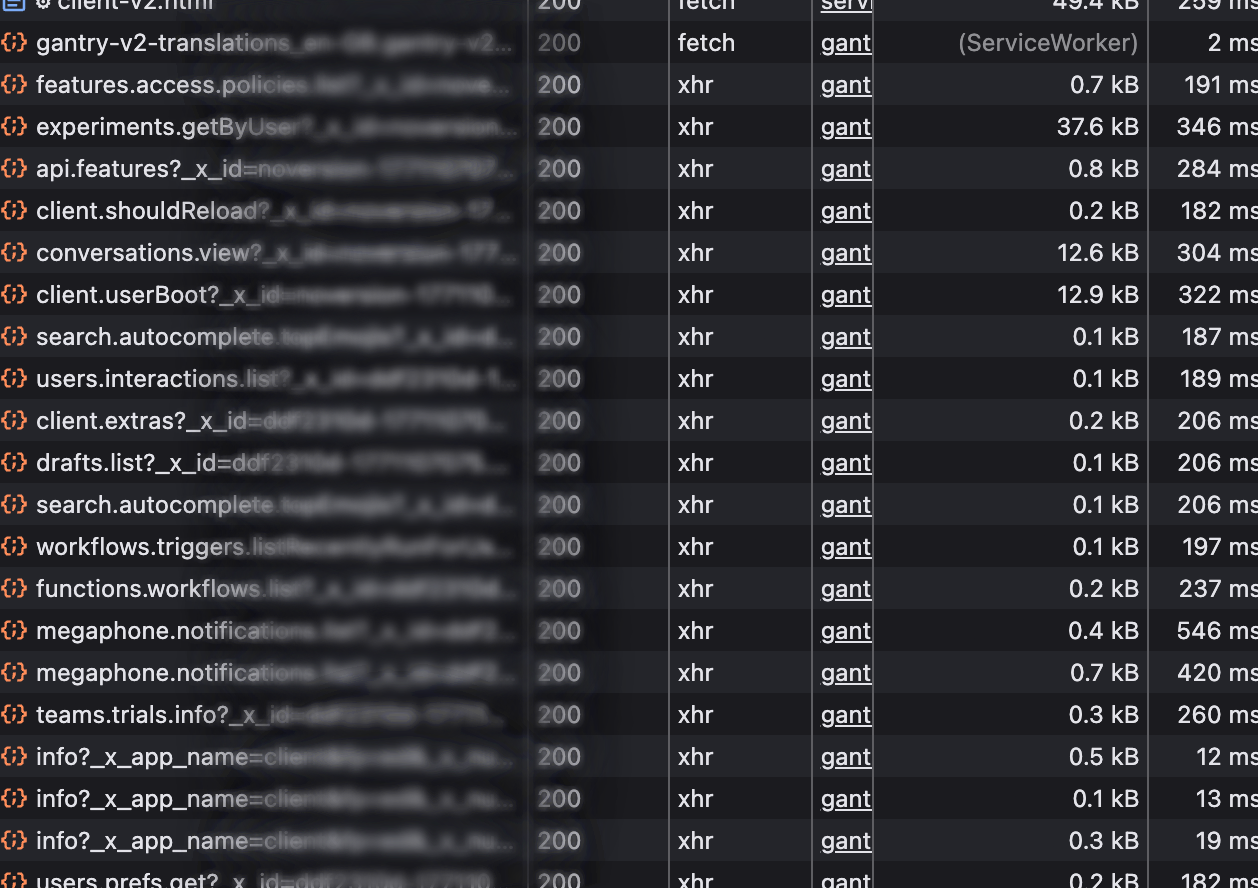
This is, strictly speaking, a non-standard API optimised for the browser, and whose undocumented endpoints can change at any time. But this is a one-time process, on a workspace I am leaving anyway, and it's not like I'm creating a commercial tool I sell licenses for here.
We can use any of these endpoints in Python, though obviously they fail as I am not sending any authentication identifier:
{"ok": false, "error": "not_authed"}But these browser requests are authenticating themselves somehow, though inspecting the headers/cookies didn't prove too useful. The conversations.view endpoint for example was returning some of the exact data I needed, but trying to manually recreate the request in Python by replicating headers or params that looked useful was just getting bounced back in the same way.
Rather than trying to start from a bare request and build a valid one, I decided to go from the other direction. I got the browser to turn the request it was making into a full curl command, and got Claude to convert that to a Python requests call - with every single header, param, and cookie present in the browser request. This did indeed return the JSON I needed from the Python call:
{
    "ok": true,
    "history": {
        "messages": [
            {
                "user": "UAHXMJRXW",
                "type": "message",
                "ts": "1664624985.747779",
So now I could just remove things from the request one at a time (headers, params etc.) until I found something vital whose omission causes the request to fail.
As it turns out, the request only needs two things - a cookie containing various opaque tokens, and a token sent in the request body. If you omit either of these, the request fails, but you don't need anything else. These are obtained by the browser when you sign in there, and can be easily lifted out.
Embedding these credentials in the script for now, the next step was to decide what data I actually wanted, and how to get it. The messages were the main thing, but first you need to know what conversation you're fetching them for. The users.conversations endpoint, it turns out, will list all conversations of the four types - private channels, public channels, DMs, and multi-member conversations. Though only those you have access to, of course.
This endpoint doesn't tell you what users are present - or it does, but only via ID. (I discovered, not entirely to my delight, that my own ID has been U03FFART9RP for the last four years for example.) To get the information on each user, you can use the conversations.view endpoint the browser uses to go channel by channel and get the metadata, which lists the full user objects.
I had validated the approach of accessing the data by mimicking the browser, but I still didn't have the meat I had come for - the message history.
The conversations.history endpoint will return, for a given channel ID, a full page of messages in JSON. And these are quite detailed objects. You get plain text representations, rich text blocks, metadata about associated files, reply count, timestamps, and sender information. More than enough.
But there were a few issues to solve here:
- There is no obvious pagination mechanism (the cursor field always seems to be empty), and only 30 or so most recent messages are returned. It turns out you can move backwards through the conversation using the timestamp of the earliest message, and keep going until no new messages are returned. You need to do a bit of de-duplication here as the next page also includes the message whose timestamp you used.
- Slack messages can have replies, which this endpoint doesn't return. The endpoint for getting replies is different (
conversations.replies) but much of the logic of parsing the output and paginating is the same. I repurposed the functions for getting the main body, and call them recursively on each message with areply_countof more than 0. - Slack messages can also have attachments, which this endpoint also doesn't return. I did consider just ignoring this, but it turns out to be fairly straightforward to just send GET requests to the URLs provided in the message JSON. It does skip the download if the file already exists in the location it's trying to save to though.
The tool was now sending a lot of requests - one for every page, and at least one request per message with replies. Understandably, this was triggering rate limiting - there are a maximum number of requests per minute allowed. I added somewhat generous backoff pauses, and small delays between every request.
To go from script to useable tool, I then tidied it up a little, broke it into functions, added the credentials to a separate config file, and added utilities for saving the output to a desired location.
I now had a tool which could seemingly generate a full JSON export of my entire Slack activity, but this is the sort of thing that is hard to verify. I'm hardly going to read the entire JSON output to check every message is present. I added two tools for making at least basic sanity checking easier.
- Firstly, after downloading each channel, the tool now dumps a simple plain text export of the messages to the same location as the JSON output. This is a convenient way to scan the messages, search if a particular message is present, and generally confirm that channel export looks at least vaguely the way it is expected to.
- Secondly, I added a second script to open the Slack export and create a visualisation of each channel over time in terms of message activity, allowing you to confirm that the channels that should have loads of messages do, that channel activity rises and falls broadly the way you are expecting, and that each channel is present and accounted for.
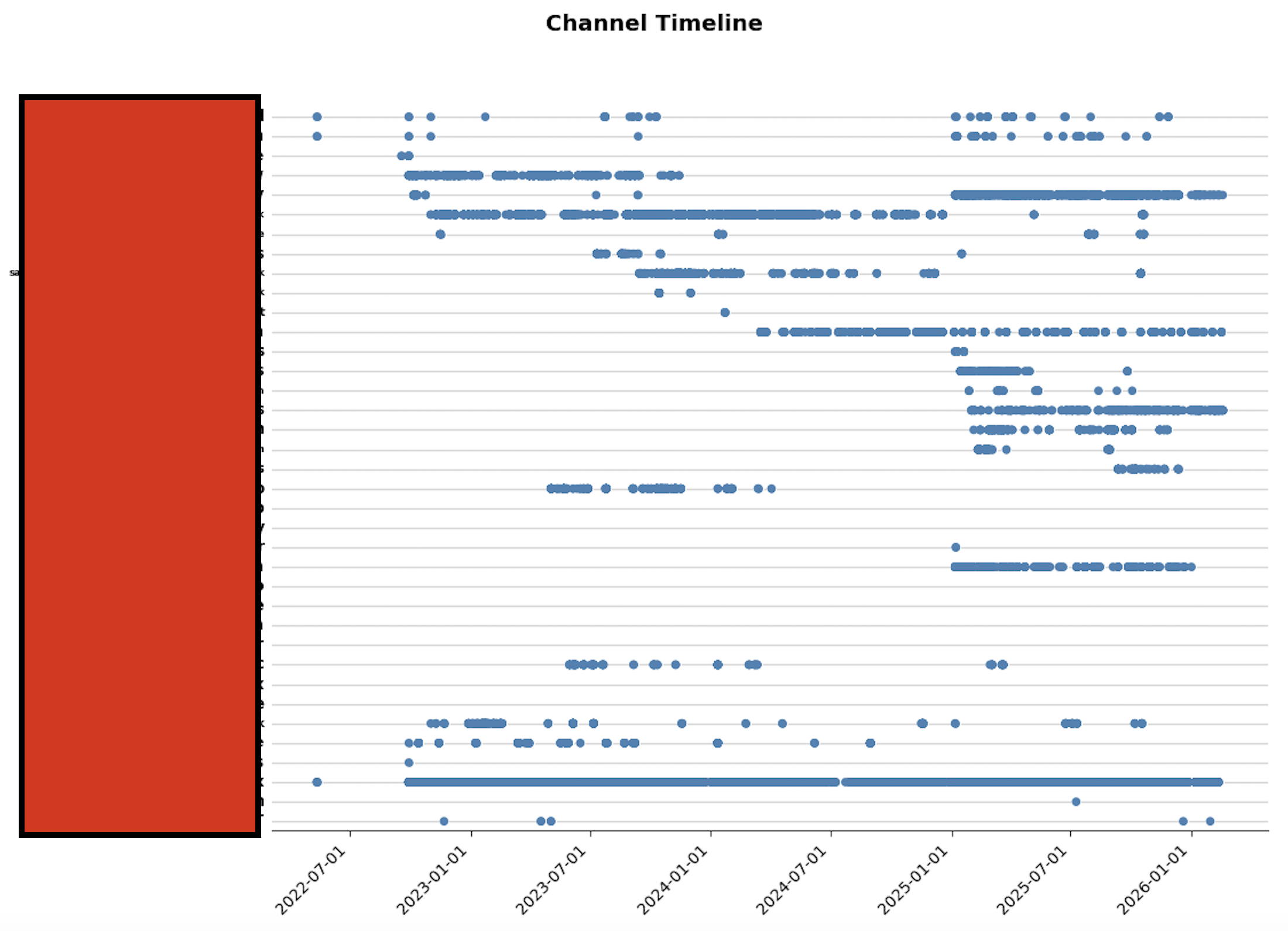
Visualisation of message activity per channel/conversation over time. Channel names redacted.
The tool is on github. It has a few additional features I added once I'd decided to publish it, that others may find useful - exporting only a single channel for example, or restarting from the last point if there's an issue.
There is something comforting about compressing a tumultuous four years of your working life into a single JSON file - especially once the phase of your life in which you are generating that particular data, ends. There is something comforting too, I think, in taking control of your own data and storing it yourself - where no one can take it away from you.